

- Home
- Features
- Poker Grind
- Live Session Mode
Live Session Mode - Real-Time Poker Tracking Software
Live Session Mode is real-time poker tracking software built for MTT players who multitable. It replaces spreadsheets and manual tracking with a fast, automatic system — so your results, stats, and buy-ins are always up to date while you play.
What Our Live Session Mode Does While You Play
Live Tracking MTTs
Input results while you play
Track your buy-ins and re-entries
Real-Time Results Input
During your session, our Grind Panel stays visible as a floating window next to your tables. Enter results without switching tabs, minimizing tables, or interrupting your focus. Built for multitabling — every input takes seconds.
What you can input:
- Add re-entries, rebuys, and add-ons
- Mark tournaments as busted or finished
- Enter winnings from prize pools or bounties
- Add details like final position or final table (FT) finish
Our tracking software is designed for speed — update results during live play or 5-minute breaks without losing focus or missing a hand.
10k+
Real-Time Stats From Your Playing Session
Our poker tracking software calculates all key stats automatically — no manual entry required. Get a complete real-time overview of your session including number of active tables, number of cashes, final tables reached, and re-entries count.
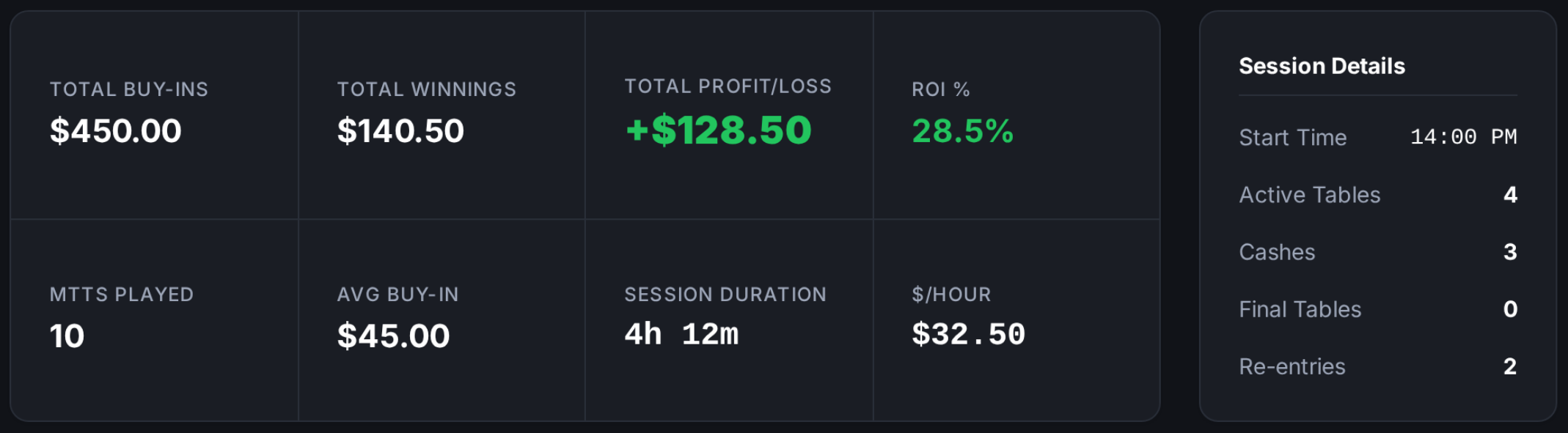
Total Buy-ins
Total Winnings
Total Profit / loss
Number of MTTs played
Average Buy-in
Session Duration
ROI (%)
Hourly Rate ($/hour)
99%
Tournament Tracking & Status
Our Live Session Mode displays every tournament in your session in one place — active, planned, finished, and busted — so you always have a complete picture of where your session stands.
Each tournament has its own status:
- Playing – currently active
- Finished – completed with a cash result
- Busted – eliminated without cash
- Planned – not started yet but included in your session
Our poker tracking software shows upcoming tournaments before they start — so you always know what’s next and never miss a registration window.
Questions About Live Session Mode
What is Live Session Mode?
Live Session Mode is the real-time poker tracking software built into Selection Poker. It lets you manage and update your MTT session while you play — automatically calculating your results, stats, buy-ins, and performance as your session progresses. It replaces spreadsheets, manual tracking, and separate tools with one fast, automatic system that works in the background while you focus on the tables.
How does Live Session Mode connect to the Grind Panel?
They are two views of the same session — always fully synced. Live Session Mode is your full dashboard where you manage and review your session in detail. The Grind Panel is a compact floating window that sits next to your tables for quick result entry during play. Every result you log in the Grind Panel instantly updates Live Session Mode, and every change you make in Live Session Mode appears immediately in the Grind Panel. One session, two views, no manual syncing required.
How do I enter results during a session?
Your Grind Panel stays visible as a floating window next to your tables throughout the session. Mark tournaments as busted or finished, add winnings from prize pools or bounties, and track re-entries, rebuys, or add-ons in just a few clicks — without interrupting your game or switching screens. The Grind Panel is specifically designed for this: quick result entry during live play or 5-minute breaks.
What information can I input for each tournament?
For each MTT in your poker tracking software, you can log: bust or finish status, re-entries, rebuys, and add-ons, prize pool winnings and bounty winnings separately, finished position, and final table appearances. The more detail you enter, the more accurate your session statistics, ROI, and historical performance data will be — all of it feeds automatically into your Session History after the session ends.
Can I manage tournaments during the session?
Yes. Our poker tracking software lets you add or remove tournaments at any point during a live session — even ones that weren't in your original plan. You can also exclude tournaments from your statistics or re-activate them if you make a mistake. Every change updates your session totals instantly.
What is tournament status?
Each tournament can have one of the following statuses:
Playing – currently active
Finished – completed with a cash result
Busted – eliminated without cash
Planned – not started yet but included in your session
This helps you clearly track your progress and stay focused on active tables.
Does the app track re-entries, rebuys, and add-ons?
Yes. Our poker tracking software tracks all re-entries, rebuys, and add-ons in real time — both per tournament and as part of your overall session totals. They're included in your total buy-in calculation automatically, so your investment figures are always accurate without any manual tallying.
Can I correct mistakes during the session?
Yes. Our poker tracking software lets you edit any result, re-activate a tournament, or exclude it from statistics at any point during or after the session. Nothing is locked in — if you entered the wrong cash amount, marked the wrong status, or forgot a re-entry, you can fix it immediately and your session stats will update instantly.
What happens after the session ends?
When your session ends, Selection Poker automatically saves all data — buy-ins, results, re-entries, profit, and stats. Everything flows into your Session History where you can review your performance, compare it to previous sessions, and analyze your results by date range, site, or format. If any tournaments were not updated, the system automatically marks them as busted so your data remains complete.
Is it optimized for multi-tabling?
Yes. Selection Poker is built specifically around real MTT multi-tabling experience. The interface is fast, simple, and designed to handle 10+ simultaneous tournaments without slowing you down. Quick result entry, floating panel visibility, and one-click status updates all exist because we know that every second you spend on tracking is a second away from making decisions at the tables.